Set-Up
- Find a Co-Host (maximum is one).
- Announce in Discord server in #session-announcements using format and in-game. (Example of in-game announcement: “h A Shift is being hosted, come to the Sessions room to attend and show great activity!”)
- No helpers are allowed
Host/Co-Host Requirements
- Host/Co-host must be CP+
- Supervisor must be FD+
- Must use grammar at ALL times.
- Must respect ALL trainees.
- Remove any rule breakers from the shift.
- Only BOG+ are allowed to make shift’s promotional
- Only CAC - PC are allowed to make promotional shifts with BOG+ perms.
Extra Info
-
If the host is CP, the supervisor (FD+) needs to do the admin things like locking/unlocking the SR, announcing calls, kicking/s-banning/g-bannning raiders and more.
-
I have created an auto shift grader here on Google forms to help you.
Shift Calls
(The supervisor will announce if the host is CP due to the admin for CP being removed) Supervisor/Host: h A Shift is being hosted, come to the Sessions room to attend and show great activity!
Introduction
- STS on the Host/Co-Host lines
Host: Hello, welcome to my Shift! My username is (Username) and my rank here at Stateview Corporation is (Rank). My Co-Host will now introduce themselves.
Co-Host: Hello, I am (Username) and my rank here at Stateview Corporation is (Rank). I will be Co-Hosting today’s Shift!
Host: Before we begin, let’s go over a few rules to help you pass this Shift!
Host:
I - Do not say PTS (Permission To Speak) while I am speaking.
II - Follow all orders given to you by a CP+ unless they ask you to break the rules.
III - If there is any problem, come to me, my Co-Host or any other CP+ for assistance.
IV - No asking for promotions/ranks.
V - You must use grammar at all times.
Dismissing the attendees
How the shift works:
Only 0 - 3 Captains are allowed.
Warden+ can be chosen to be Captain.
(If handing out roles) Before starting, the Host or Co-Host May copy and paste all the roles and their purposes.
The Host will then go to each person stating their role or post, and what they do.
You may check with all the attendees to see if they understand their roles/post they’ve been assigned to.(Just to clear any confusions they may have.)
After everyone gets their role/post and understands what they are doing, they may be released to their role duties.
HOST MUST PICK EITHER ROLES OR POST. DO NOT PICK BOTH.
Host: I/The Co-host will now give out the roles.
The Host or Co-Host will now hand out posts to the trainees then go back to STS.
Posts:
Maximum Security
Solitary Confinement
Cell Blocks
Canteen
Shower
Yard
Watchtower - Yard
Watchtower - Front gates
Control room
Captain - Head of a group of people, keeping control in their group and restoring order.
Host: I will now explain the roles.
Roles:
Patrol Team - Patrols the prison, follows the status.
Scout Team - Patrols outside the prison and guards the prison from watch towers.
Response Team - Guards around the set status, answers to any panic calls, watches over checkpoints and control room.
Camera Operator - Works on cameras, reporting about the prison on the radio.
Captain - Head of a group of people, keeping control in their group and restoring order.
Host: Just some extra notes to keep in-mind.
Host: We will be using channel 2 for this shift, use the format [Role] message when speaking in chat.
Host: Example: [Scout] Front gate is clear!
- You will now announce that no-one can change the Status or lockdown, example below. (Only Host and Co-Host can change the Status and turn on/off lockdown)
- More attendees are allowed to join halfway, throughout the shift.
Host/Co-Host/Supervisor: “h Please do not change the Status or mess around with lockdown due to an on-going shift, failure to due so will result in a punishment.”
Host/Co-Host, please wait for 10 - 40 minutes until calling them back. While waiting you are required to supervise the attendees.
Lockdown drill
This is not required but it might give you a better grade
- Go to the control room
- Activate lockdown
- Announce this:
H [Lockdown Drill] There is now a lockdown drill ongoing. All Inmates should be transported to the Cell Block and be placed in cells.
Wait 5-10 minutes then continue - Ask in radio if all prisoners/inmates are in cells
- Turn off lockdown
- Announce this:
H [Lockdown Drill] The lockdown drill is now complete. Continue with the status.
Concluding the Shift
Host/Supervisor: “h Can everyone from the Shift please come back to the Sessions room”
Host: Welcome back everyone, how was the shift?
Wait for them to answer
Host: Great! Now before I announce the hardest workers, let’s take a photo!
Make the trainees STS again and then take the “proof” or screenshot needed for the Training log.
Normally there are 2 ways of taking the screenshot.
The Line: (Popular)
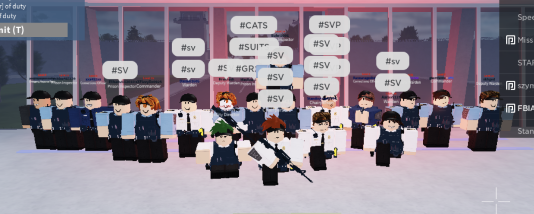
An example
The Wedge:
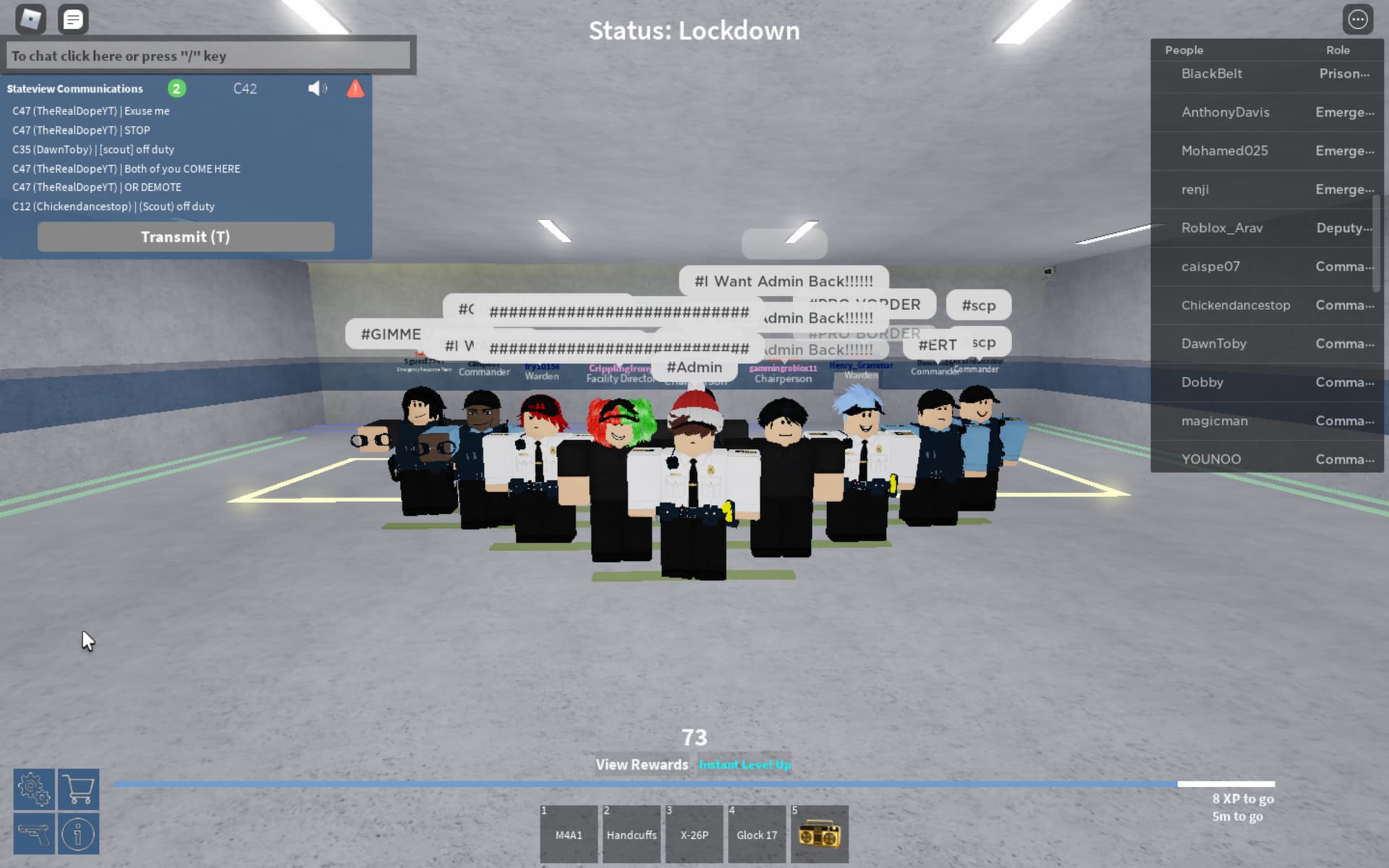
An example
After taking the photo:
Host: Thank you for attending my Shift today. I would like to say that it has been a pleasure to be your host today!
Co-Host: Also from me, thank you for participating in our shift, dismissed!
-
After you conclude your training, log it in #shift-logs and delete your session in #session-logs!
-
Keep in mind, if a Community Advisory Council+ Is hosting a shift, they are allowed to promote people depending upon how much dedication they put into it… However, they need Board of Governors+ permissions. Read Staff-announcements for more information.
Credit to the original shift guide.
RalphLaz’s tips:
Set a timer for 12 minutes,
When the timer reaches 6 minutes to a lockdown drill, when is reaches 10 then turn off the lockdown drill get hardest workers and head back to the sr.