STATEVIEW CORRECTIONAL FACILITY
Training Guidelines

The Stateview instructional training session is designed to equip our staff with the knowledge, skills, and professionalism required to excel in their roles. Our training sessions are planned and executed to ensure all participants gain a deep understanding of the facility’s operations, protocols, and expectations.
-
Find a Co-Host (Maximum is 2, must be Chairperson+).
-
Find Helpers (Maximum is 2, must be Superintendent+ and verified in both main and admin servers).
-
Ensure you have at least 8 attendees to begin. This ensures a productive and engaging training session.
-
Note that failed trainings will not count towards quota. It is crucial to prepare thoroughly and adhere to guidelines to ensure success.
-
Claim a hosting spot through Bloxcord and follow the provided instructions. (More information on how to use the Bloxcord session interface here ).
-
Make an in-game announcement: “
h There's a Training being hosted in the session room, come and attend to show activity and possibly receive a promotion!”- If you do not have the minimum amount of attendees required to start the session, you are permitted to make 2 additional bonus calls. If you are still under the attendee requirement, you must cancel the session. (This session will not count towards your activity.)
-
Professionalism: Maintain professionalism at all times. Your conduct sets the tone for the training session and reflects on the organization.
-
Grammar: Use proper grammar at all times. Clear and correct communication is key to effective training.
-
Respect: Show respect to all trainees. A respectful environment fosters better learning and engagement.
-
Pace: Keep a consistent and reasonable pace. Ensure that all trainees can follow along without feeling rushed or left behind.
-
Rule Enforcement: Remove any rule breakers from the training session promptly to maintain order and focus.
-
Hosting Without a Supervisor: Community Advisory Council+ members may host without a supervisor, showcasing their experience and trust within the organization.
-
Evaluated High-Rank Officer(s) are exempt from requiring a supervisor, as their role signifies proven competence and reliability.
-
Facility Director(s) must be supervised by either a Facility Director with Elevated High-Rank Permissions or a Community Advisory Council+ member to ensure the session is held to proper standards.
Important Note: Supervisors for basic trainings must be present both at the start of the session and during scenario segments. Their oversight is essential to ensure the session meets all organizational expectations and maintains quality and structure.
-
Review the Training Material: Before starting the session, thoroughly review all training materials. Being well-versed in the content will allow you to answer questions confidently and provide clear instructions.
-
Prepare for Questions: Anticipate potential questions trainees might have and prepare clear, concise answers. This will help keep the training session running smoothly.
-
Set Clear Objectives: Clearly outline the objectives of the training session at the beginning. This helps trainees understand what they are expected to learn and achieve by the end of the session.
-
Engage Trainees: Encourage active participation from all trainees. Use questions, discussions, and interactive activities to keep everyone engaged.
-
Feedback: Collect feedback from trainees at the end of the session. This can provide valuable insights into what worked well and what can be improved for future training sessions.
SESSION INTRODUCTION
This section is designed to set the tone for the training session by introducing the hosts and outlining key rules and expectations. It ensures all participants understand the importance of respect, proper conduct, and active participation. Following these guidelines will help create a smooth and productive training environment.|
[
The host will STS on the first line, Co-Host(s) on the second line, Helper(s) on the third line, and Supervisor on the fourth line.]
Host: Hello. Welcome to today’s training! My name is [Name], and I’ll be your host.
Co-Host: Hey! I’m [Name], your co-host, and I’ll be assisting in today’s training.
[
The Host/Co-Host may select their own greeting/introduction. However, it must be appropriate and professional.]
Host: I will now go over the rules for this training.
Host:
I – You must refer to me and my Co-Host by our ranks at all times.
II – Do not go AFK (Away From Keyboard) or say PTS (Permission To Speak) while I am speaking during this training. Doing so will result in a removal or a strike.
III – You must be respectful to everyone at all times. Failure to do so will result in removal from the training and possibly further sanctions.
IV – If there is any problem, come to me, my Co-Host, or any other SI+ for assistance. You must not ask for a promotion/rank, or you will be instantly removed.
V – Trolling in any form is unacceptable! Grammar must be used throughout this training. Trolling or failure to use grammar will result in a strike or instant removal from the training.
VI – PTS is active unless stated otherwise by me or my Co-Host.
- This training will consist of four sections- Faces, Questions, Scenarios, and Accuracy.
SESSION FACES
This section focuses on practicing and perfecting the basic “faces” commands to ensure trainees are attentive and responsive. It tests reaction time and listening skills, which are crucial for maintaining order and discipline. By mastering these commands, trainees demonstrate their readiness for more advanced tasks.
Host/Co-Host: We will begin with the faces.
Host/Co-Host: In this phase, we will be testing your reaction time and listening skills!
Host/Co-Host: Please listen carefully, as I will only explain each face once. DO NOT actually do the faces at this point.
Host/Co-Host:
-
Left Face – Turn left 90 degrees from your current position.
-
Right Face – Turn right 90 degrees from your current position.
-
Center Face – Turn to your normal position (the position you are in right now).
-
About Face – Turn 180 degrees from your current position.
-
Control Face – Face the Host/Co-Host at all times (they should be in the middle of your screen at all times).
Host/Co-Host: Please note: Only the center face breaks control face—any other face does not.
Host/Co-Host: If you are sat, DO NOT jump unless I say so. Failure to follow this rule will result in a strike.
Practice and Elimination Round
This section outlines the two key phases involved in the Faces Portion of the session: the Practice Round and the Elimination Round.
[The practice round is completely optional; however, the elimination round is mandatory.]
[Practice Round: In this round, you will not disqualify any attendees from the session. If an attendee does the wrong face, you will tell them to fix it to the correct one. You should do the practice round before the elimination round.]
[Elimination Round: In this phase, attendees that do the face either too slowly or incorrectly will be sat. There is no maximum number of passers for this phase. Once an attendee has been sat, they have failed this phase.]
[Upon completion of session faces, move on to the next section.]
SESSION QUESTIONS
In this section, trainees will be tested on their grammar and knowledge skills through a series of questions. This ensures they have a clear understanding of the facility’s operations and can communicate effectively. Proper responses demonstrate their readiness to handle various situations appropriately.
Host/Co-Host: We are now moving on to questions. In this phase, I’ll be testing you on your grammar and knowledge of the rules.
Host/Co-Host: To start this off, I will send you a private message with the questions I will state shortly. DO NOT send your answers yet.
Host/Co-Host: I will state the questions in Channel 2. DO NOT say the answers out loud—reply only to the PM.
Host/Co-Host: You have 3 minutes, starting now!
- PM (Private Message) the trainees once.
- Questions are required to be answered—troll answers will result in removal from the training.
- Attendees must answer each question with professionalism and proper grammar.
- You are required to ensure that every attendee receives a PM.
- The host may pick from the examples listed below, or create their own with approval from the current session supervisor.
[
You may choose two of the following questions listed to send to the attendees, or you may come up with your own questions (must be approved by the current session supervisor).]
- What is Lethal Force used for?
- What are handcuffs used for?
- What is a taser used for?
- What is a gun used for?
- What are a few reasons you should put an inmate in Maximum Security?
- What are a few reasons you should put an inmate in Solitary Confinement?
- What is a reason to use the modcall system?
- What would you do if you see someone breaking Roblox ToS?
- What would you do if you see an abuser in-game?
[
You are required to state the correct answers once the responses have been reviewed.]
[Upon completion of session questions, move on to the next section.]
SCENARIO INFORMATION
This section outlines the two key phases involved in the Scenarios portion of the session: the Preparation Phase and the Response Phase.
Two people should be teamed as inmates from the session administration, if possible. The host/supervisor ensures that the scenarios are done properly.
Host/Co-Host: We are now moving onto Scenarios! In this phase, we are testing you on your knowledge of the rules, comprehension, grammar, and question correctness—along with your proficiency with equipment!
Host/Co-Host: I will now state 3 important rules for this session.
Host/Co-Host:
- DO NOT actually frisk or kill the inmates. (Use verbal commands like -frisks- instead.)
- DO NOT step outside the pink box.
- The tools permitted for this section are handcuffs, tasers, Glocks, and shields. The use of any other tools will result in failure.
Host/Co-Host: Each of you will be tasked with an appropriate interaction demonstrated by the inmate. Your responses should follow the facility’s rules and guidelines.
- Prepare: Ensure you and the trainee are ready. The inmate will act out a scenario, and the attendee must respond correctly.
- Demonstrate: Begin the scenario by performing the actions related to the situation. For example, if the scenario is “Inmate Shooting,” simulate a shooting scenario.
- Respond: The trainee should react to your actions according to the rules and guidelines.
SCENARIO SIMULATION DEMONSTRATION(S)
This section outlines various Scenario Simulation Demonstrations, where the helper will simulate different behaviors or situations for the trainee to respond to. These scenarios test the trainee’s ability to handle different situations appropriately according to the facility’s rules.
-
Inmate Shooting: The helper will simulate an inmate shooting scenario.
-
Inmate Spamming: The helper will act out an inmate spamming behavior.
-
Inmate Disrespect: The helper will demonstrate an inmate being disrespectful.
-
Using Keycard to Escape: The helper will pretend to use a keycard to escape.
-
Bypassed Audio/Boombox Abuse: The helper will simulate abuse of audio or boombox features.
-
Exploiting: The helper will act out exploiting behavior.
-
Punching: The helper will portray an inmate punching.
-
Cross Teaming: The helper will simulate cross-teaming behavior.
-
Using Knife: The helper will demonstrate a scenario involving a knife.
-
Crossing the Red Line: The helper will act out crossing the red line.
-
Unauthorized Area: The helper will simulate entering an unauthorized area.
-
Escaping or Attempted Escape: The helper will simulate an escape or attempted escape.
-
AFK Farming: The helper will demonstrate AFK farming.
- We ask that the helper stands on one end of the box, while the attendee stands on the opposite side
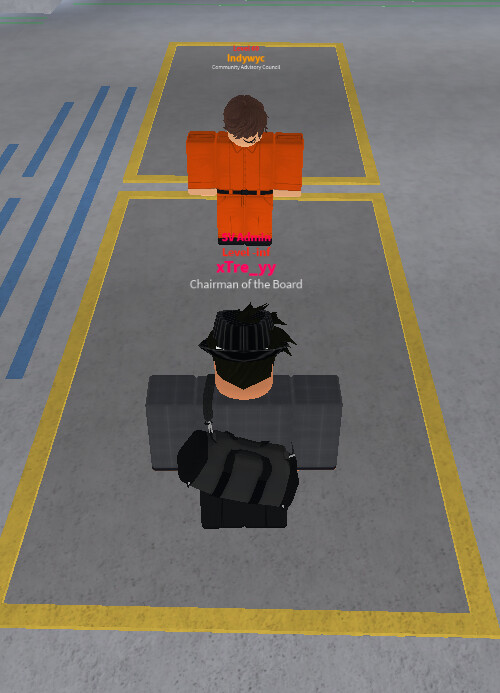
Host/Co-Host: Now, please split up into 2 equal groups on the lime instructional lines along the room.
[
The inmate and attendee should stand on opposite sides of the boxes, facing each other.]
[
Upon completion of session scenarios, move onto the next section]
SESSION SHOOTING & ACCURACY
In this section, we will assess attendees’ precision and aiming skills. Each attendee will take turns testing their shooting accuracy to ensure they meet the required standards.
-
Prepare the Room: Create a straight line in the session room along the blue instructional line(s).
-
Accuracy Testing Room: Call each attendee individually into the accuracy testing room and proceed with instructions.
-
Shooting Statistics: Attendees must hit a minimum of 15 targets to pass this section. You can check their shooting statistics in the accuracy status in-game.
-
Relocate Attendees: After completing the accuracy test, move the attendees back to the session room and position them on the green-instructional line(s).
-
Time Management: This section may take the most time, so expedite checking staff cooldowns to maintain efficiency.
Host/Co-Host Instructions:
Host/Co-Host: We are now moving on to the accuracy phase! In this section, we will evaluate your precision, aiming skills, listening abilities, and overall accuracy.
Host/Co-Host: You are only allowed to use the Glock-17 for this phase, and you must stay behind the red line at all times. Failure to follow these rules will result in failing this phase.
Host/Co-Host: Without further ado, please relocate to the blue instructional line behind the host’s instructional lines.
-
Call Attendee: “(Username), please follow me into the accuracy room.”
-
Instruct Attendee: Once in the accuracy room, have the attendee stand on the red-instructional line.
-
Give Shooting Instructions:
- Knock your weapon!
- Ready!
- Aim!
- Fire!
-
Check Results: Ensure the attendee hits at least 15 targets to pass the section.
-
Relocate: After completing the test, guide the attendee back to the session room and position them on the green-instructional line(s).
[
Upon completion of session shooting and accuracy, move onto the next section]
-
Line Up Trainees: Once the accuracy phase is complete, line up all trainees along the blue instructional line closest to the window(s) in the session room.
-
Mark Attendance: Tick “passed” on Bloxcord for attendees who have successfully completed at least 3 phases of the training.
-
Promote: Confirm the passers and proceed to the “ranking” section to promote those who are off cooldown.
-
Grade Each Other: The hosting team should then move to the “grading” section and grade each other’s performance.
-
Logging: Use the correct format for logging channels located in our administration server .
Host: We have now completed all phases of the training! I will announce the passers shortly. During this time, you may chat among yourselves (PTS inactive).
- Upon completion of determining the passers of the session, please announce each one individually
Host: If you have been promoted from this training, your cooldown will range from 3 days to 1 week. Please check with us if you’re unsure about your cooldown period!
Host: This concludes our training session! It has been an honor and a pleasure to be your host today.
Co-Host: I also want to express how wonderful it was to be your co-host today! You all did an excellent job! All dismissed!
“
h The training is now over! Passers, please say !rejoin to view your new ranks! All dismissed from the session room!”